UI / UX Design
AirPods Pro 3 Demo Workflow
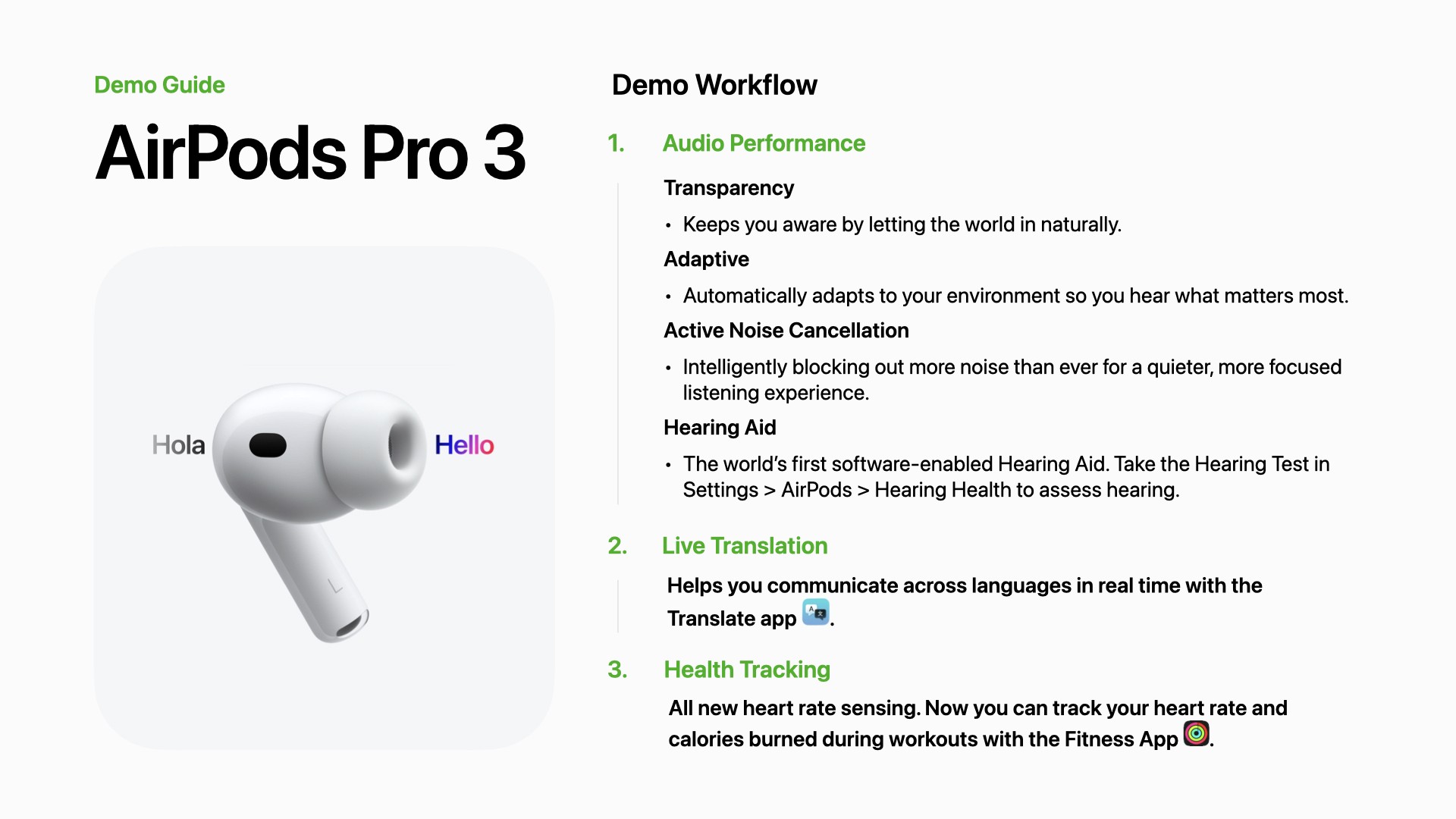
Designed an AirPods Pro 3 demo workflow that helps Specialists consistently guide customers through personalized demos.
Year :
2026
Role :
Specialist, UX Designer
Client :
Apple Retail
Project Duration :
4 Weeks
OVERVIEW
Designing a guided Apple Retail demo
Designed and led a standardized customer demo workflow that helped Apple Retail Specialists confidently demonstrate the newly released AirPods Pro 3, creating a more consistent customer experience during the holiday launch.
PROBLEM
Understanding the customer moment
Customers received inconsistent demonstrations depending on who assisted them.
Specialists emphasized different features and answered questions differently.
Newer team members didn't have a resource to reflect on for demos
DESIGN PROCESS
Creating A Demo Workflow Through Collaboration
Research
Across the sales team, we collaborated to understand what specialists and customers needed.
We:
Observed how differently we demonstrated AirPods Pro 3 to customers.
Identified common customer questions.
Documented which features were commonly asked for by customers and which were being promoted most by Apple
initial prototype
Created a 9-page workflow covering:
How to Demo
Feature explanations & Troubleshooting Q&A
Customer Testing
Piloted the workflow with a few specialists, leadership, and customers. Below was the Feedback.
Areas of improvement:
Hard to keep track of where to be during the workflow; too much text
Recognition:
Troubleshooting section helped specialists solve technical problems in the moment
Iterated Design (Final Solution)
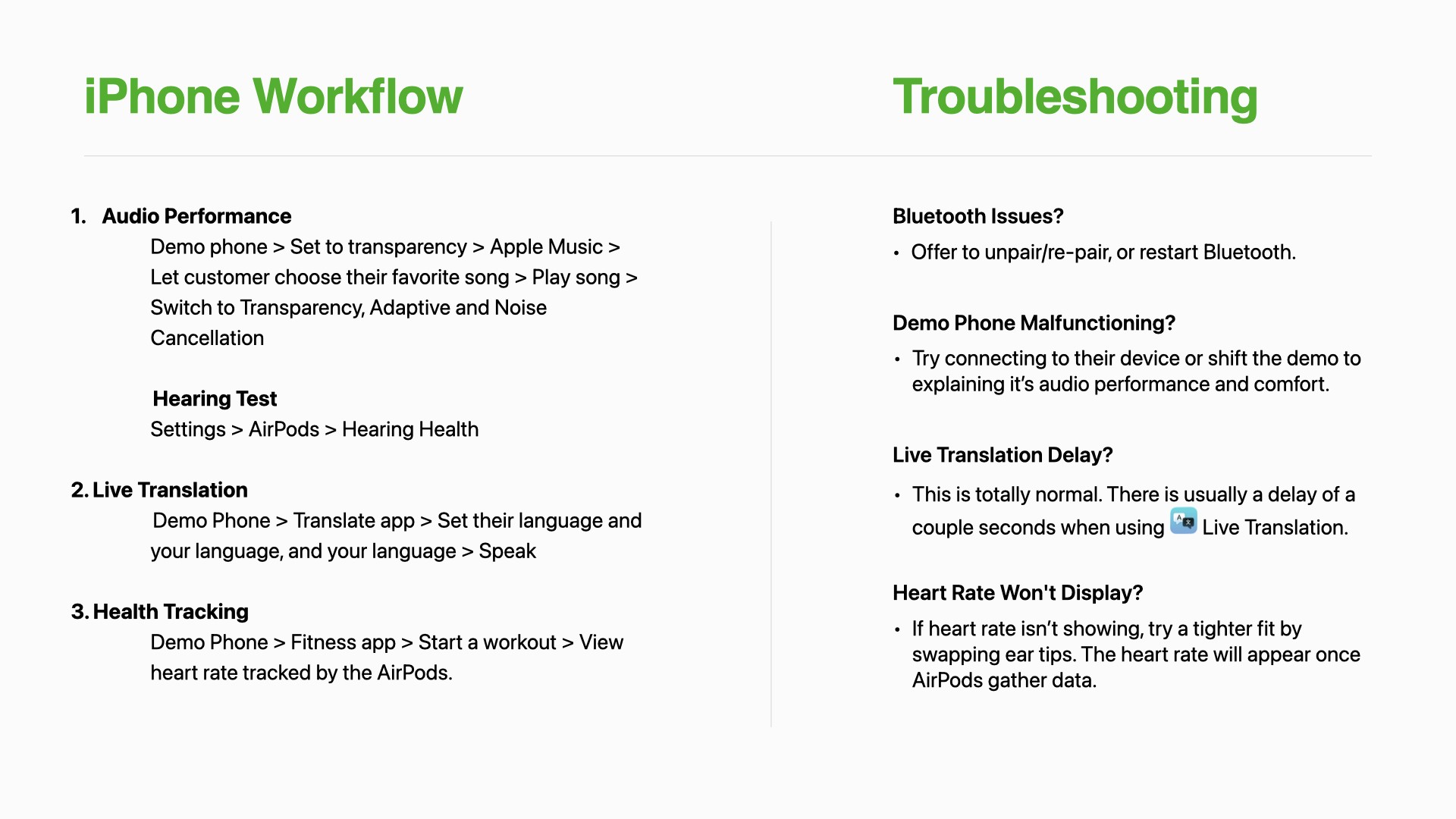
Based on feedback, we decided to move forward with a ONE-PAGE infographic that highlights its features. Then, in the back of the infographic, there will be an FAQ with the most asked questions. Troubleshooting questions will be displayed on the iPad that we use to troubleshoot on the floor
DESIGN PROCESS
Creating A Demo Workflow Through Collaboration
Research
Across the sales team, we collaborated to understand what specialists and customers needed.
We:
Observed how differently we demonstrated AirPods Pro 3 to customers.
Identified common customer questions.
Documented which features were commonly asked for by customers and which were being promoted most by Apple
initial prototype
Created a 9-page workflow covering:
How to Demo
Feature explanations & Troubleshooting Q&A
Customer Testing
Piloted the workflow with a few specialists, leadership, and customers. Below was the Feedback.
Areas of improvement:
Hard to keep track of where to be during the workflow; too much text
Recognition:
Troubleshooting section helped specialists solve technical problems in the moment
Iterated Design (Final Solution)
Based on feedback, we decided to move forward with a ONE-PAGE infographic that highlights its features. Then, in the back of the infographic, there will be an FAQ with the most asked questions. Troubleshooting questions will be displayed on the iPad that we use to troubleshoot on the floor
RESULTS
Final Design

RETROSPECTIVE
The Impact Of Collaboration
This project was built on feedback across customers, specialists, and leadership
The Demo workflow helped the sales team to feel confident in demonstrating the AirPods Pro 3 Demo; it was also a consistent way to demo.
More Projects

New release
Preview
UI / UX Design
AirPods Pro 3 Demo Workflow
Designed an AirPods Pro 3 demo workflow that helps Specialists consistently guide customers through personalized demos.
Year :
2026
Role :
Specialist, UX Designer
Client :
Apple Retail
Project Duration :
4 Weeks
OVERVIEW
Designing a guided Apple Retail demo
Designed and led a standardized customer demo workflow that helped Apple Retail Specialists confidently demonstrate the newly released AirPods Pro 3, creating a more consistent customer experience during the holiday launch.
PROBLEM
Understanding the customer moment
Customers received inconsistent demonstrations depending on who assisted them.
Specialists emphasized different features and answered questions differently.
Newer team members didn't have a resource to reflect on for demos
DESIGN PROCESS
Creating A Demo Workflow Through Collaboration
Research
Across the sales team, we collaborated to understand what specialists and customers needed.
We:
Observed how differently we demonstrated AirPods Pro 3 to customers.
Identified common customer questions.
Documented which features were commonly asked for by customers and which were being promoted most by Apple
initial prototype
Created a 9-page workflow covering:
How to Demo
Feature explanations & Troubleshooting Q&A
Customer Testing
Piloted the workflow with a few specialists, leadership, and customers. Below was the Feedback.
Areas of improvement:
Hard to keep track of where to be during the workflow; too much text
Recognition:
Troubleshooting section helped specialists solve technical problems in the moment
Iterated Design (Final Solution)
Based on feedback, we decided to move forward with a ONE-PAGE infographic that highlights its features. Then, in the back of the infographic, there will be an FAQ with the most asked questions. Troubleshooting questions will be displayed on the iPad that we use to troubleshoot on the floor
DESIGN PROCESS
Creating A Demo Workflow Through Collaboration
Research
Across the sales team, we collaborated to understand what specialists and customers needed.
We:
Observed how differently we demonstrated AirPods Pro 3 to customers.
Identified common customer questions.
Documented which features were commonly asked for by customers and which were being promoted most by Apple
initial prototype
Created a 9-page workflow covering:
How to Demo
Feature explanations & Troubleshooting Q&A
Customer Testing
Piloted the workflow with a few specialists, leadership, and customers. Below was the Feedback.
Areas of improvement:
Hard to keep track of where to be during the workflow; too much text
Recognition:
Troubleshooting section helped specialists solve technical problems in the moment
Iterated Design (Final Solution)
Based on feedback, we decided to move forward with a ONE-PAGE infographic that highlights its features. Then, in the back of the infographic, there will be an FAQ with the most asked questions. Troubleshooting questions will be displayed on the iPad that we use to troubleshoot on the floor
RESULTS
Final Design
RETROSPECTIVE
The Impact Of Collaboration
This project was built on feedback across customers, specialists, and leadership
The Demo workflow helped the sales team to feel confident in demonstrating the AirPods Pro 3 Demo; it was also a consistent way to demo.
More Projects
New release
Preview
UI / UX Design
AirPods Pro 3 Demo Workflow
Designed an AirPods Pro 3 demo workflow that helps Specialists consistently guide customers through personalized demos.
Year :
2026
Role :
Specialist, UX Designer
Client :
Apple Retail
Project Duration :
4 Weeks
OVERVIEW
Designing a guided Apple Retail demo
Designed and led a standardized customer demo workflow that helped Apple Retail Specialists confidently demonstrate the newly released AirPods Pro 3, creating a more consistent customer experience during the holiday launch.
PROBLEM
Understanding the customer moment
Customers received inconsistent demonstrations depending on who assisted them.
Specialists emphasized different features and answered questions differently.
Newer team members didn't have a resource to reflect on for demos
DESIGN PROCESS
Creating A Demo Workflow Through Collaboration
Research
Across the sales team, we collaborated to understand what specialists and customers needed.
We:
Observed how differently we demonstrated AirPods Pro 3 to customers.
Identified common customer questions.
Documented which features were commonly asked for by customers and which were being promoted most by Apple
initial prototype
Created a 9-page workflow covering:
How to Demo
Feature explanations & Troubleshooting Q&A
Customer Testing
Piloted the workflow with a few specialists, leadership, and customers. Below was the Feedback.
Areas of improvement:
Hard to keep track of where to be during the workflow; too much text
Recognition:
Troubleshooting section helped specialists solve technical problems in the moment
Iterated Design (Final Solution)
Based on feedback, we decided to move forward with a ONE-PAGE infographic that highlights its features. Then, in the back of the infographic, there will be an FAQ with the most asked questions. Troubleshooting questions will be displayed on the iPad that we use to troubleshoot on the floor
DESIGN PROCESS
Creating A Demo Workflow Through Collaboration
Research
Across the sales team, we collaborated to understand what specialists and customers needed.
We:
Observed how differently we demonstrated AirPods Pro 3 to customers.
Identified common customer questions.
Documented which features were commonly asked for by customers and which were being promoted most by Apple
initial prototype
Created a 9-page workflow covering:
How to Demo
Feature explanations & Troubleshooting Q&A
Customer Testing
Piloted the workflow with a few specialists, leadership, and customers. Below was the Feedback.
Areas of improvement:
Hard to keep track of where to be during the workflow; too much text
Recognition:
Troubleshooting section helped specialists solve technical problems in the moment
Iterated Design (Final Solution)
Based on feedback, we decided to move forward with a ONE-PAGE infographic that highlights its features. Then, in the back of the infographic, there will be an FAQ with the most asked questions. Troubleshooting questions will be displayed on the iPad that we use to troubleshoot on the floor
RESULTS
Final Design
RETROSPECTIVE
The Impact Of Collaboration
This project was built on feedback across customers, specialists, and leadership
The Demo workflow helped the sales team to feel confident in demonstrating the AirPods Pro 3 Demo; it was also a consistent way to demo.
More Projects
New release
Preview